
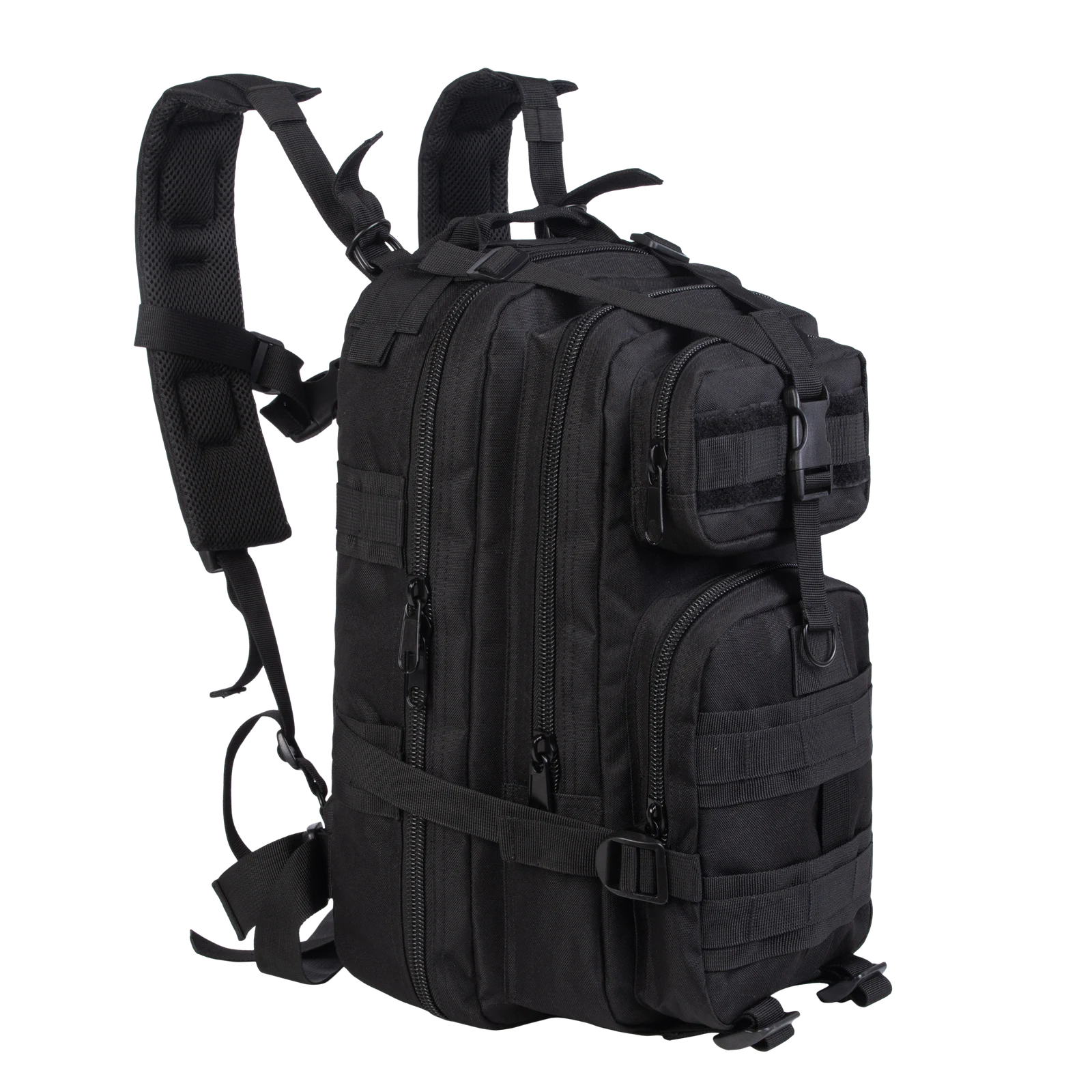
Stacked front pockets are useful when the user knows where to look for a particular item. Achieving that requires a stable job for each pocket, a realistic allowance for the thickness of its contents and a clear access sequence. Two extra zippers alone do not create useful organization.
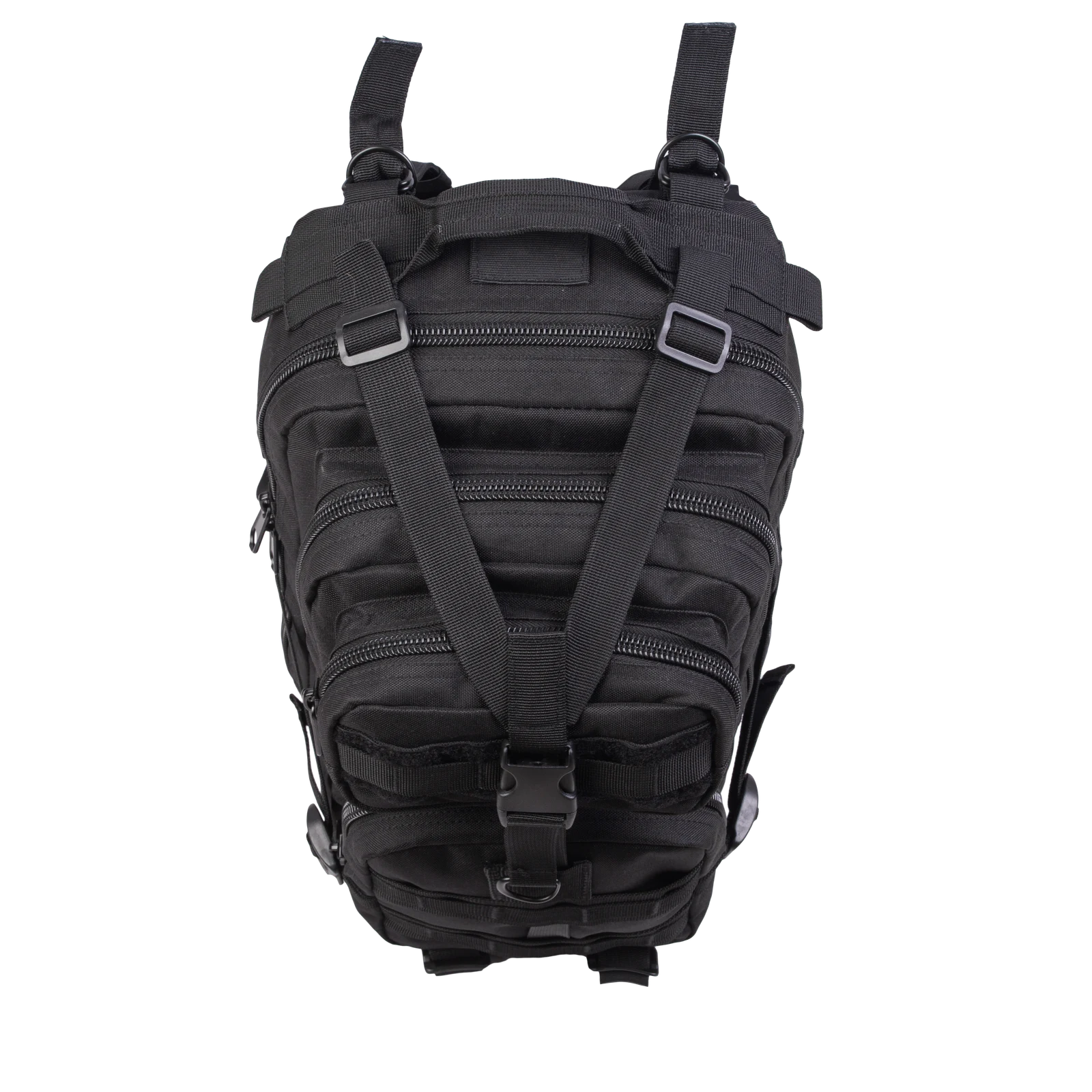
These company-library photographs show pocket positions and external routes. They do not show the internal dividers, so this article makes no claim about the number of inner sections or the pockets' measured capacity.
01
Group contents by the moment of use
One pocket can serve a group of items needed during short stops, while the other serves items used after arrival. Personal accessories and connection cables, for example, can first be grouped by task and then checked against the actual pocket shape. The examples are proposed contents, not accessories supplied with the pictured product.
Keep the grouping reasonably stable. If an item moves between the upper and lower pocket from day to day, the extra compartment has not reduced the search. A product brief should explain the intended routine clearly enough that a developer can judge whether the layout supports it, rather than describing every pocket as suitable for everything.
02
Consider the space used by the hand
An upper pocket is not automatically the easier one to use. The angle changes when the pack rests on a desk, a lap or the floor. Standing access, seated access and use with gloves can also place different demands on the opening and the space around a pull.
Locate the two openings on the sample before evaluating one-handed access. Review the complete action in the main intended condition: identify the correct pocket, locate the pull, open it and remove the target item. A zipper that moves freely in an empty sample is only one part of that sequence.
03
Manage the projection of loaded pockets
The side view shows the front compartments projecting ahead of the main body. Plan the thickness of their contents together with the overall outline, particularly when a rigid case, charger or other fixed-shape object is proposed. An item can fit through an opening while still making the loaded pocket awkwardly bulky.
Avoid defining maximum use by forcing both pockets full at once. Compare fewer rigid objects, a different division of tasks or a revised pocket depth. The objective is a practical daily shape. No volume is calculated from these photographs, and no claim is made about compliance with an airline's baggage dimensions.
04
Make the opening routes recognizable
A compact pack can present front-pocket zippers alongside long openings around the main body. The user encounters that whole group, not an isolated pull in a component drawing. Observe where each route starts, where its pull is left and whether several pulls gather in the same small area.
Position and modest tactile differences can support identification without making every pull longer. If different tabs are specified, consider whether they can catch on nearby objects, enter another zipper path or cover an adjacent pull. Compare them with the intended contents inside, because the relative positions can change as the pockets fill.
05
Define the role of the front strap assembly
The top view shows two diagonal straps converging at a front buckle. Define whether this assembly needs to be loosened or moved before accessing a particular pocket, and how it is restored afterward. Do not describe access as requiring no buckle release when the necessary action has not been demonstrated.
If the upper pocket is intended for frequent stops, compare the strap route with that opening as part of the product arrangement. The visible assembly does not establish a validated method of carrying a particular object outside the pack. Any proposed attachment use needs its own matched sample and appropriate verification.
06
Hand over a purpose for every compartment
Keep the approved sample identifiable
For OEM/ODM development, pair the contents plan with loaded photographs. Identify the use situation served by each pocket, the shape of its target objects, the acceptable projection and the main access condition. When pocket depth, pull design or the external strap route changes, return to the same objects so the comparison remains meaningful.
The intended result is less searching and less repeated sorting. If users still open every compartment to find one item, reconsider the division of tasks and the recognition cues before adding more dividers. A few well-defined spaces can be more useful than a larger number of poorly differentiated ones. Explore related topics on the JKPD blog.
Related: modular backpack interior space. See the photographed product reference.
Discuss your bag development project
ANSON XIE
General Manager & Founder
Quanzhou Junkai Pengda Special Equipment Co., Ltd.
Email: ansonxie@jkpdtime.com
Phone: +86 177 5095 3355
WhatsApp: +86 177 5095 3355
Factory address: Floors 2–4, Building 1, Phase I, Huixin Intelligent Manufacturing Industrial Park, Hui'an County, Quanzhou, Fujian, China